


And why every online seller should download theirs
If you sell on Etsy, Shopify, TikTok Shop, Faire or WooCommerce, your platform is quietly storing a complete record of everything you have ever sold.
Every order. Every product. Every sale. Every date.
And most sellers have never looked at it.
It’s called a CSV file. And once you know what it is and what it contains, you’ll wonder how you ever ran your business without downloading it.
So what actually is a CSV file?
CSV stands for Comma Separated Values – which tells you absolutely nothing useful, so let’s ignore that.
Here’s what it actually is: a spreadsheet of your complete sales history.
Think of it like your platform’s memory. Every time someone places an order with you, that platform records it – the product, the price, the date, the platform fees, the shipping charged, everything. A CSV file is simply all of that information saved into a file you can open on your computer, usually in Notepad.
It looks a bit like this when you open it:
Sale Date,Order ID,Title,SKU,Quantity,Price,Shipping,Tax,Fees
2024-03-01,ET12345,Handmade Candle,CAN001,1,12.00,3.50,0.80,1.20
2024-03-02,ET12346,Wax Melt Pack,WM001,2,8.00,2.90,0.60,0.90
2024-03-03,ET12347,Soy Candle Gift Set,CAN002,1,18.00,3.50,1.20,1.80
Row after row after row of your sales history, going back as far as your first order.
It’s not exactly easy on the eye though is it.
Why does this matter for your business?
Here’s the honest answer: the dashboards your platforms show you are designed to make you feel good about your sales. They show you revenue, orders, views, conversion rates – the headline numbers.
What they don’t show you is the complete picture. And there are some questions they simply cannot answer:
- Which of my products is actually PROFITABLE after fees, materials and packaging?
- Which platform is WORTH the most to my business – not just in volume, but in real money after fees?
- Which MONTHS are my best sellers across all my platforms combined?
- Am I BUSIER than last year, or just the same amount of busy?
These are the questions that actually drive business decisions. And the answers are all sitting in your CSV data, waiting to be found.
The sellers who plan ahead are using this data
The online sellers who always seem to have the right stock at Christmas, who run the right promotions at Easter and Mother’s Day, who never seem to get caught out by a slow January – they’re not guessing.
They’re looking at what happened last year and planning from that.
Your CSV file contains your full seasonal history. Download twelve months of data and you can see, in black and white:
- Which month was your biggest
- Which products peaked at Christmas versus Mother’s Day
- Which platform drove the most orders in Q4
- Which months were quieter – so you can plan your cash flow around them
That’s not data for data’s sake. That’s genuinely useful information that changes how you run your business.
How to download your CSV file
Every platform does this slightly differently. Here’s a quick guide to the most popular ones:
Etsy
- Go to Shop Manager
- Click Settings → Options
- Click the Download Data tab
- Under Orders, choose your CSV Type, Month and Year
- Click Download CSV
Etsy exports one month at a time, so you may need to download several months separately if you want a full year of data.
Shopify
- Log in to your Shopify Admin
- Click Orders in the left menu
- Click Export (top right)
- Choose your date range and select CSV for Excel
- Click Export orders
If you have more than 50 orders, Shopify will email the file to you rather than downloading it directly.
WooCommerce
WooCommerce needs a free plugin called OrderFusion to export orders as a CSV. Once installed (it takes about two minutes), go to WooCommerce → Orders, use the Bulk Actions dropdown and select Export All to CSV.
Faire
- Log in to your Faire Brand Portal
- Go to Orders
- Click Export (top right)
- Select Order summary, choose your date range
- Click Export CSV
TikTok Shop
- Log in to TikTok Seller Center
- Go to Orders → Manage Orders
- Click Export Orders
- Choose your date range and format
- Download from the Export History tab when ready
What do I do with the file once I have it?
That depends on how confident you are with spreadsheets.
If you’re comfortable with Excel: open the file, insert a pivot table, and start exploring. You can filter by product, by month, by platform – and start seeing patterns in your data.
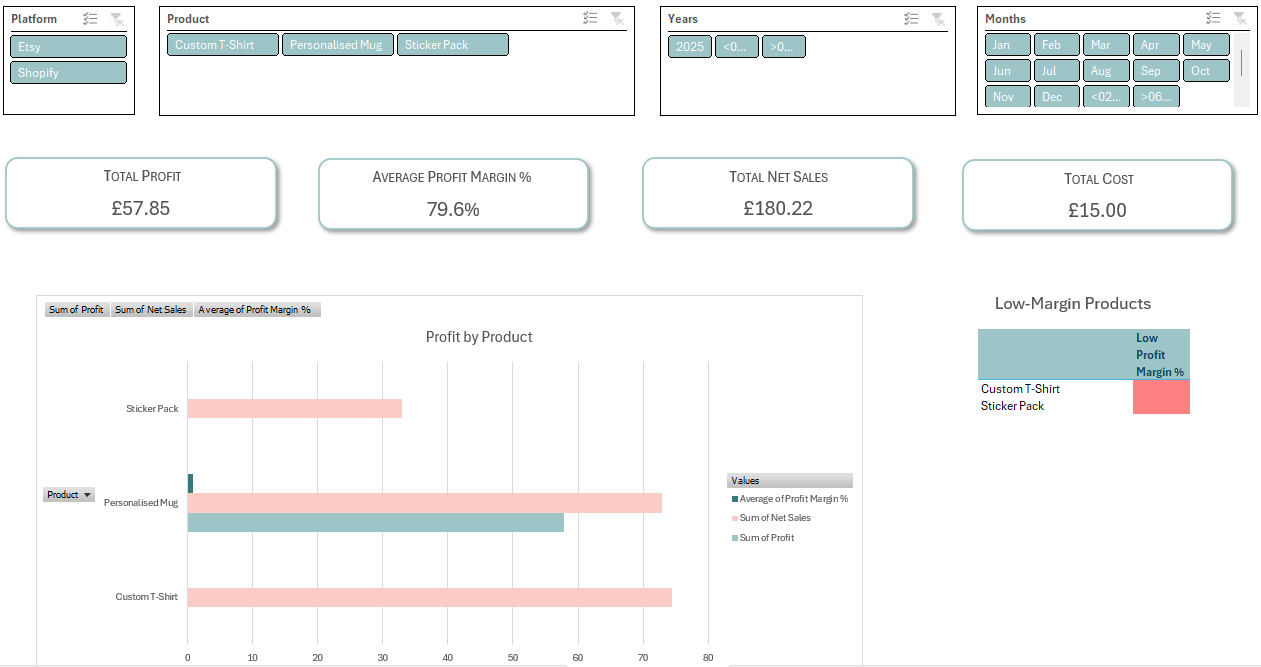
If spreadsheets make your eyes glaze over: that’s exactly what the Clarity Dashboard Bundle was built for. You download your CSV files, drop them into a folder, click refresh – and your dashboard does the rest. Three visual dashboards that show you platform performance, profitability and seasonality, all in plain English, without you touching a single formula.
Is the Clarity Dashboard Bundle right for you?
Before you click buy on anything, I want to make sure this is genuinely the right tool for you. It works brilliantly for sellers who:
✅ Sell on Etsy, Shopify, TikTok Shop, Faire, WooCommerce or Amazon Handmade
✅ Have Microsoft Excel on a Windows computer (2016 or later)
✅ Are willing to download their orders as a CSV file – I provide a step-by-step guide for every platform
✅ Are ready to spend about an hour on the one-time setup – after that it takes minutes to refresh
✅ Want to understand their true profit, not just their sales figure
If you’re ticking all five – brilliant. You’re exactly who this was built for.
If you’re not quite there yet – that’s completely fine too. Follow along here and on social media, and see what you can learn. When you’re ready, the dashboard will be here.
The bottom line
Your sales data is one of the most valuable things your business owns – and right now it’s probably sitting untouched inside your Etsy or Shopify account.
Downloading your CSV file costs nothing. It takes under a minute. And it’s the first step toward running your business on facts rather than gut feeling.
Go and download yours today. Even if you just open it, have a look at what’s in it, and close it again – you’ll start to see your business differently.
Want to go further? The Clarity Dashboard Bundle turns your CSV data into clear, visual insights – automatically. Find out more here